Stop Procrastinating.
Start Making Real Progress.
Your all-in-one AI study system that tells you what to study, keeps you focused, and tracks your progress automatically.
Stop wasting time switching between apps. Plan tasks, focus deeply, and see real progress every day — all in one place.
🔒 Trusted by 50,000+ students · Free forever · No sign-up needed
 StudyNest
"Mitochondria produce ATP via cellular respiration…"
🔗 Wikipedia · Mar 21"Photosynthesis converts light into glucose…"
🔗 Khan Academy · Mar 20"DNA replication is semi-conservative in nature…"
🔗 Wikipedia · Mar 19Every feature,
shown exactly as it looks
Click the tabs below to explore each screen.
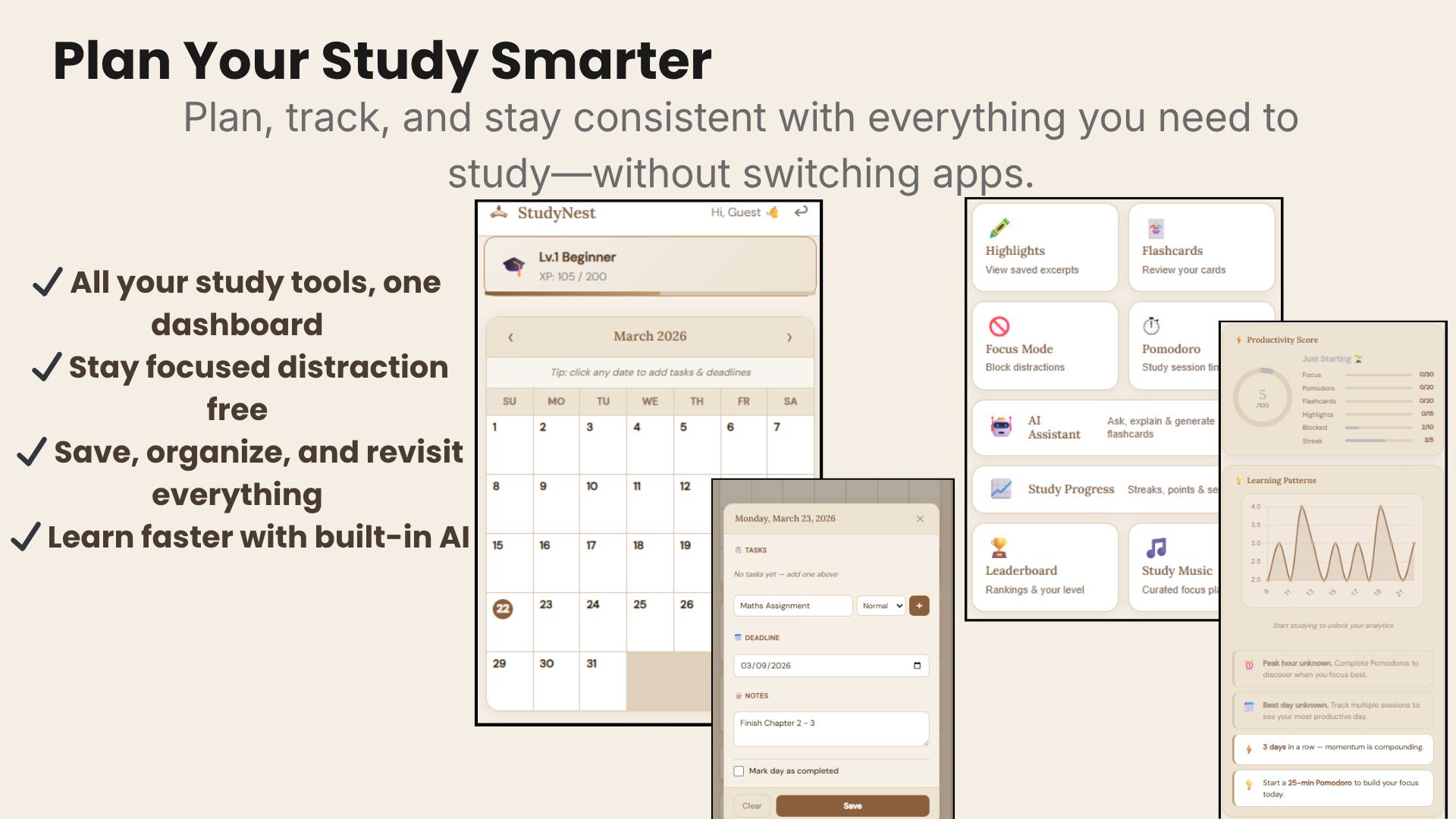
Dashboard
Your study hub — streak counter, XP bar, AI-powered tip, and today's task list load the moment you click the extension icon.
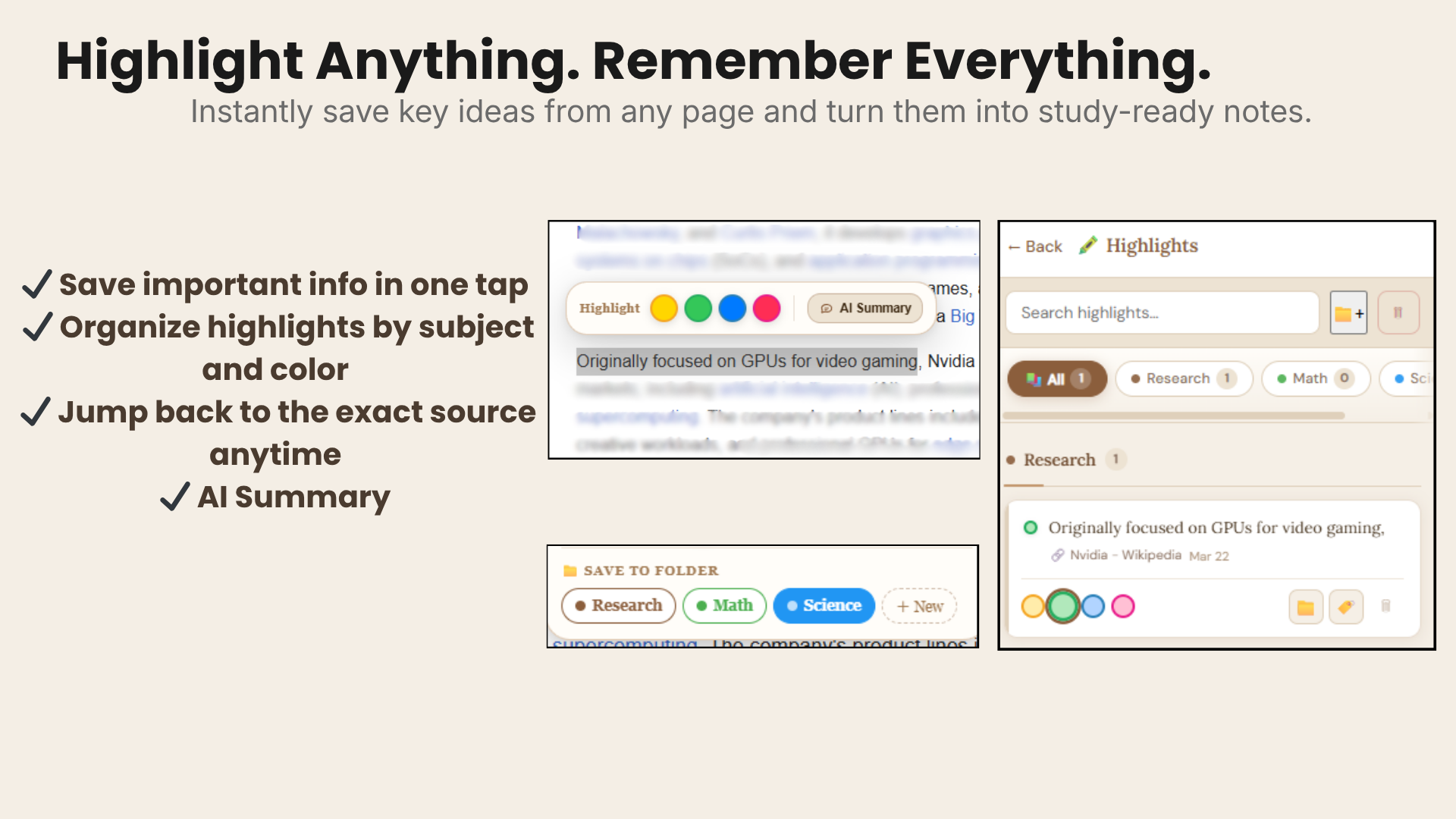
Smart Highlights
Select text on any webpage, pick a color, choose a folder. Every highlight is saved, searchable, and AI-ready.
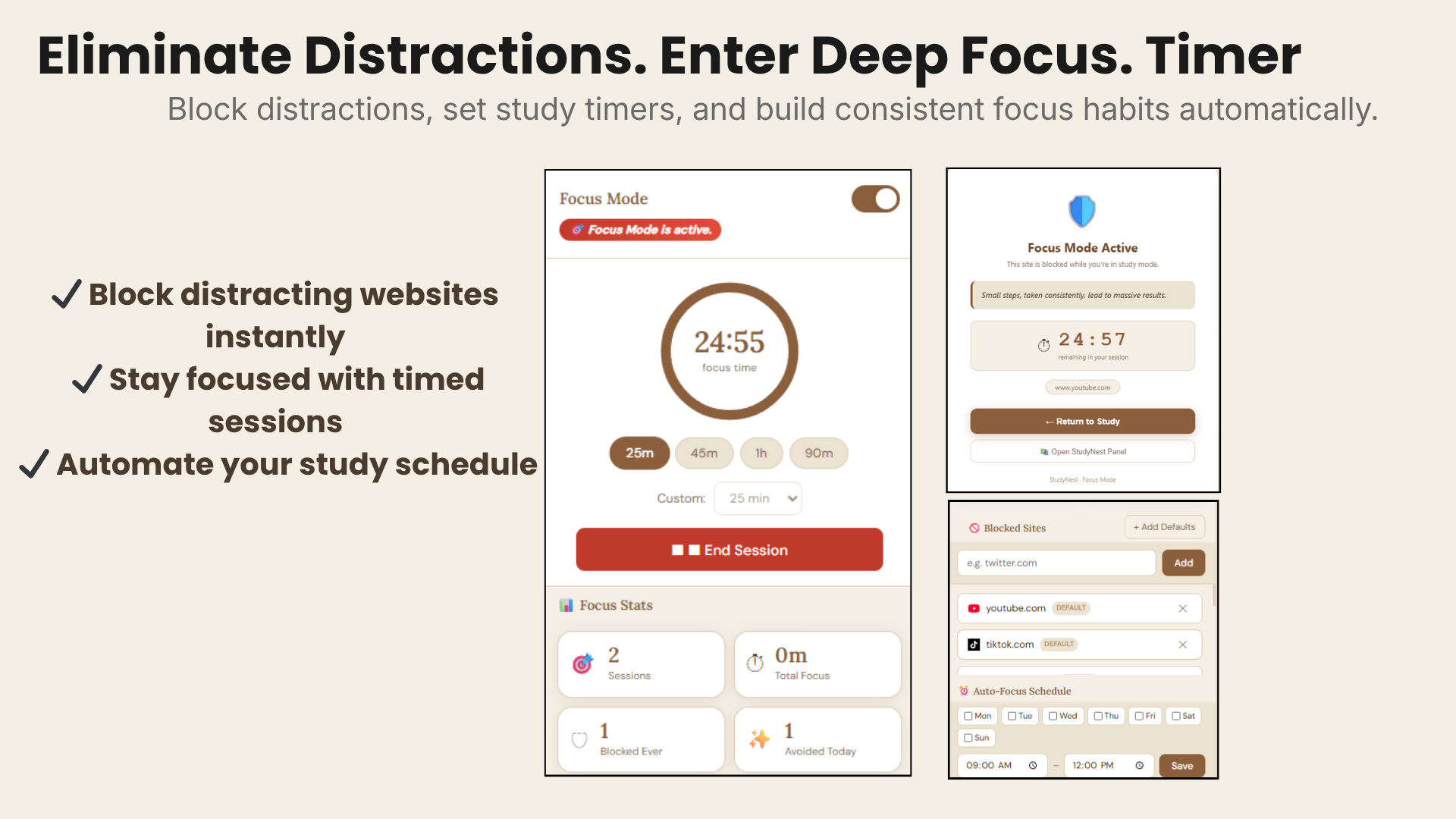
Focus Mode
Pomodoro timer + site blocker activate together. YouTube and Reddit are blocked the moment you start a session.
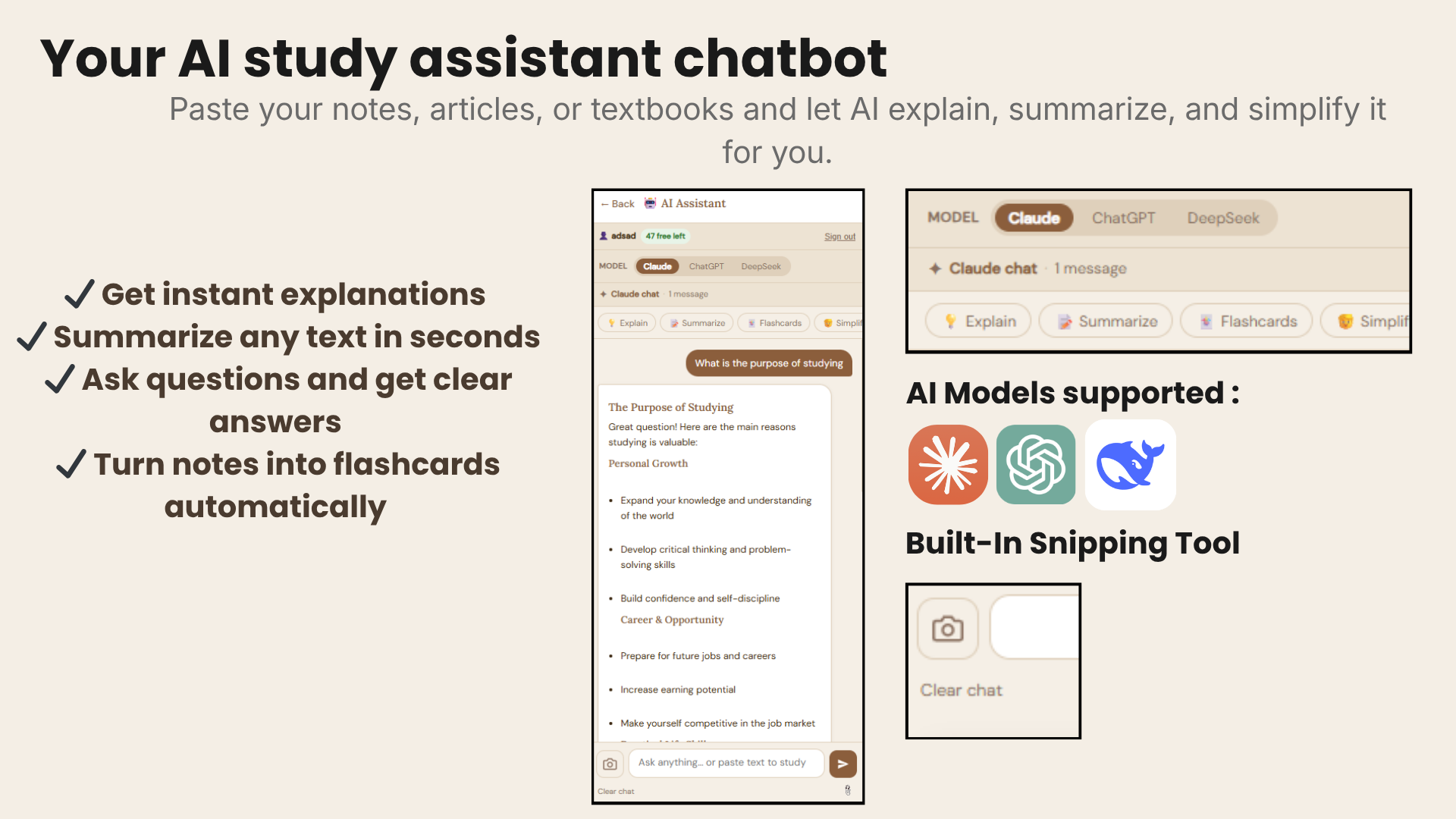
AI Assistant
Ask anything. Summarize webpages, generate flashcards, get explanations — all powered by AI without leaving your tab.
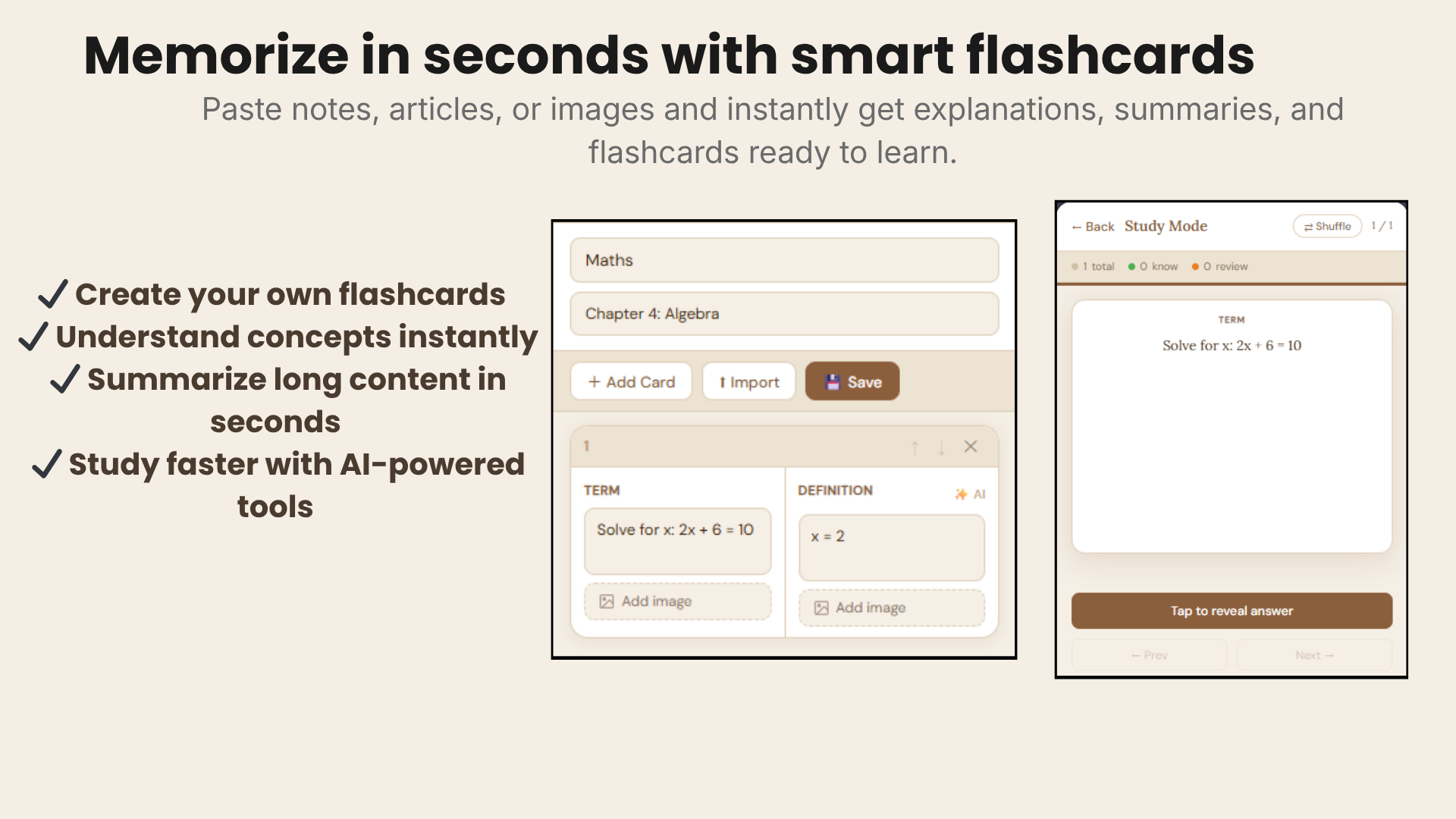
Flashcards
Create, import, or AI-generate flashcard decks. Study with spaced repetition to remember more in less time.
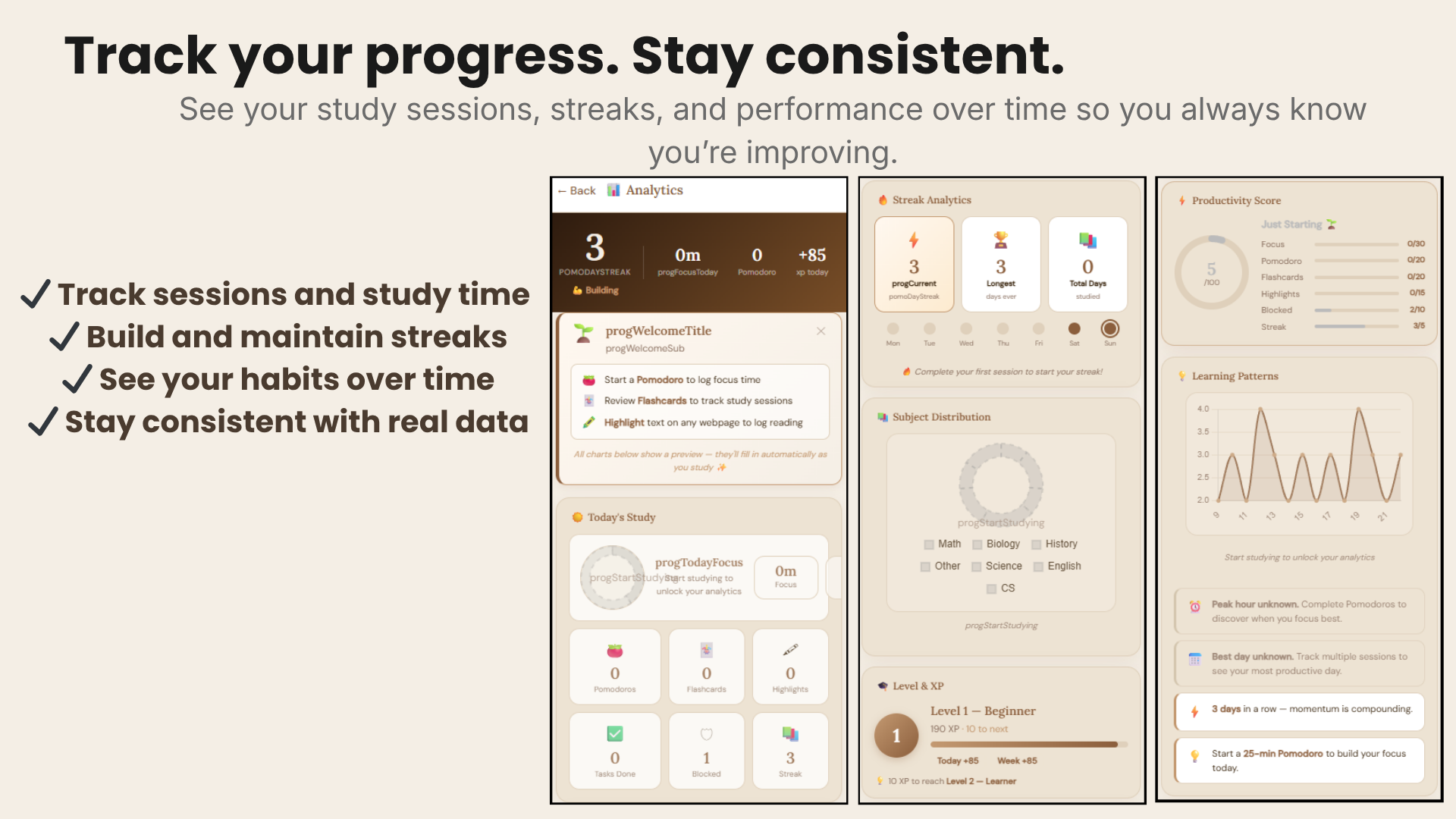
Progress Analytics
Daily heatmaps, subject breakdowns, XP system, and leaderboards. Watch your improvement compound.
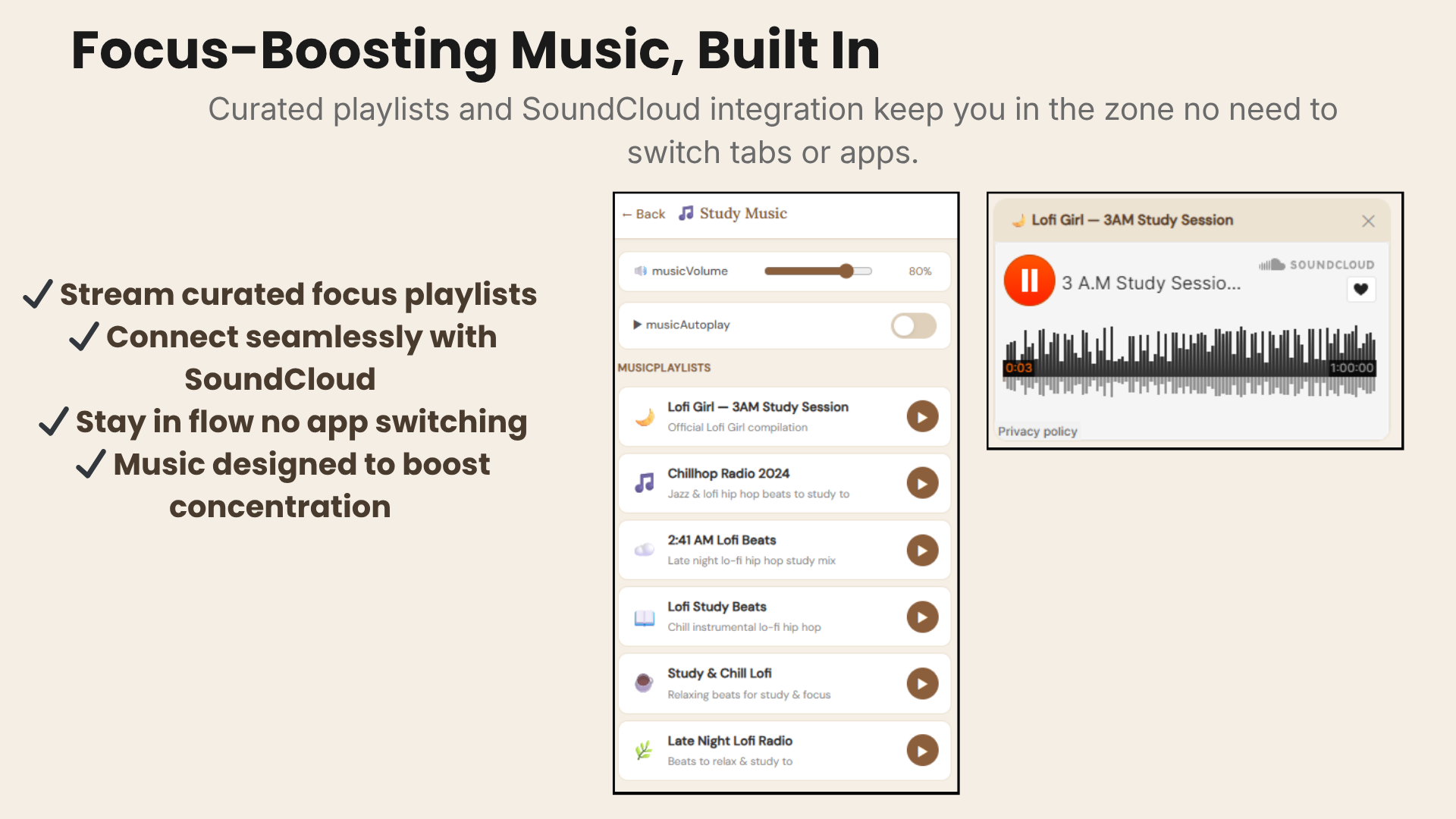
Study Music
Curated lo-fi and focus playlists built right into the extension. No Spotify needed — just press play and get into the zone.
Why most students struggle to
actually study
You open your laptop and immediately lose focus
YouTube, Reddit, Instagram. Before you know it, two hours are gone and you've studied nothing.
You don't know what to study first
You stare at five subjects, can't decide, so you do none. Decision fatigue is a real productivity killer.
You have no idea if you're making progress
You study for hours but feel like you're spinning your wheels. No data, no direction, no confidence.
StudyNest fixes all three — automatically.
Your personal AI study system,
right in your browser
StudyNest stays with you while you study. It's not another app you have to remember to open — it's always there, always smart.
AI tells you exactly what to study
Based on your schedule, past sessions, and upcoming exams, the AI surfaces what matters most — so you never waste time deciding.
Focus mode blocks every distraction
One click activates a force-field around your study time. Distracting sites get blocked, your Pomodoro timer starts, and your streak builds.
Analytics show your real progress
See daily study hours, streak calendars, XP earned, and subject breakdowns. Progress you can see is progress that keeps happening.
One extension.
Your entire study system.
Highlight & Save
Select text anywhere, pick a color, save to a folder — with AI summary in one click.
Focus Mode
Block distracting sites + Pomodoro timer. StudyNest stays with you while you study.
AI Assistant
Chat, summarize, generate flashcards and study plans — without leaving Chrome.
Flashcards
Create or AI-generate decks organized by subject. Built-in spaced repetition.
Progress Tracking
Daily heatmaps, XP system, streaks, leaderboards — see real progress every day.
Study Music
Curated lo-fi playlists for focus, directly inside the extension.
Go from install to
studying in 60 seconds
Add StudyNest to Chrome
One click. No sign-up required. The extension appears instantly in your toolbar — ready to use immediately.
Tell it your subjects & goals
Add your classes, upcoming exams, and tasks. Takes 2 minutes. The AI does the rest — building your priority list automatically.
Study, track, and improve
Start focus sessions, highlight content, chat with AI, earn XP. Watch your progress compound day over day.
Students who
actually improved
★★★★★"From barely passing to a 3.8 GPA in one semester. The AI planner showed me exactly what to focus on."
★★★★★"I get more done in 90 minutes than I used to in a whole day. Deleted every other productivity app."
★★★★★"Highlights on Wikipedia automatically go to folders and become flashcards. My whole revision system is here."
★★★★★"47 days without missing a session. I literally cannot break the streak now. The gamification works."
★★★★★"As a teacher I recommended this to my whole class. AI summaries save my students hours every week."
★★★★★"Open Chrome and it quietly keeps you on track. No setup, no learning curve. Instantly useful."
Start free.
Upgrade when ready.
Everything you need to build a study habit.
- ✓ Highlights & folder organization
- ✓ Pomodoro focus timer
- ✓ Flashcard creator
- ✓ Progress tracking & streaks
- ✓ AI chat (20 messages/day)
- ✓ Study music player
Unlock the full AI study system.
- ✓ Everything in Free
- ✓ Unlimited AI conversations
- ✓ Advanced analytics & heatmaps
- ✓ AI study schedule generation
- ✓ Export flashcards to Anki
- ✓ Priority AI response speed
No credit card required
Frequently asked
Is StudyNest really free?
Yes. The core features — planner, focus mode, highlights, flashcards, progress tracking, and AI chat (limited) — are completely free forever. Premium unlocks unlimited AI and advanced analytics.
Does it work on all websites?
Yes. StudyNest works across all websites — Wikipedia, course platforms, news sites, PDFs in Chrome, Google Docs, and more. The highlight and summarize feature works anywhere you can select text.
How is the AI powered?
StudyNest uses state-of-the-art large language models to power its AI chat, summarization, and flashcard generation. Your data is processed securely and never sold to third parties.
Can I use it without creating an account?
Absolutely. Install the extension and start using it immediately. Creating an account lets you sync your data across devices and unlocks the full feature set.
Is my study data private?
Yes. Your highlights, notes, and flashcards are stored locally on your device by default. Cloud sync is fully encrypted. We never sell your data.
Your best semester
starts today
Join 50,000+ students who stopped procrastinating and started making real progress. Free forever. Installs in 10 seconds.
Add StudyNest to Chrome — It's FreeWorks on Chrome · Edge · Brave · Opera · No account needed